Steamworks Documentation
- Documentation Home Page
- Getting Started
-
Store Presence
- Applications
- Coming Soon
- Developer And Publisher Homepages
- Early Access
- Explain Your Editions
- Franchise Pages
- Free To Play Games
- Graphical Assets - Overview
- Livestreaming
- Localization and Languages
- Pre-Purchasing on Steam
- Pricing
- Promo Event Tools, Rules, and Guidelines
- Release Dates
- Release Options
- Release Process
- Removing a product from Steam
- Review Process
- Roadmaps
- Season Passes
-
Steam China
- Steam Tags
- Store Page, Building and Editing
- Testing On Steam
- Top Sellers Lists
- Trailers
- Updating Your Game - Best Practices
- User Reviews
-
Features
- Anti-cheat and Game Bans
- Common Redistributables
- Enhanced Rich Presence
- Game Notifications
- Microtransactions (In-Game Purchases)
- Multiplayer
- Stats and Achievements
- Steam Audio
- Steam Cloud
- Steam Cloud Play (Beta)
- Steam Community
- Steam DRM
- Steam Error Reporting
- Steam Families
- Steam HTML Surface
-
Steam Input
- Action Manifest Files
- Action Set Layers
- Activators
- Browsing Configurations
- General Concepts
- Getting Started for Developers
- Getting Started for Players
- In-Game Actions File
- Input Source Modes
- Input Sources
- Legacy Mode Bindings
- Mode Shifting
- Mouse Regions
- Radial Menus
- Steam Input Devices
- Steam Input Gamepad Emulation - Best Practices
- Templates for In-Game Actions Files
- Touch Menus
- Uploading Steam Input Configs to Steam Workshop
- Steam Inventory Service
- Steam Keys
- Steam Leaderboards
- Steam Overlay
- Steam Playtest
- Steam Remote Play
- Steam Screenshots
- Steam Timelines
- Steam Voice
- Steam Workshop
- User Authentication and Ownership
- Virtual Reality
- Finance
-
Sales and Marketing
- Advertising on Steam
- Best Practices, Marketing
- Community Moderation
- Curators and Curator Connect
- Discounting
- Events and Announcements Tools
- Features And Tools, Marketing
- Followers
- Google Analytics
- Points Shop Items
- Profile Features
- Steam Branding Guidelines
- Steam Community Items
- Store and Platform Traffic Reporting
- Store Widget
-
Upcoming Steam Events
- Steam Next Fest
-
Steam Themed Sale Events
- Steam Auto Battler RPG Fest 2026
- Steam Cooking Fest 2026
- Steam Couch Co-Op Fest 2027
- Steam Desktop Companion Fest 2027
- Steam Dinos vs. Robots Fest 2027
- Steam Fighting Fest 2027
- Steam Medieval Fest 2026
- Steam Mountaineering Fest 2027
- Steam Racing Fest 2027
- Steam Real-Time Strategy Fest 2027
- Steam Rhythm Fest 2027
- Steam Scream V Fest
- Steam Sheep Fest 2027
- Steam Shop Keeper Fest 2027
- Steam Witch Fest 2027
- UTM Analytics
- Visibility on Steam
- Wishlists
- Steamworks SDK
- Web API Overview
- Accessibility Features
-
Steam Hardware
- Getting your game ready for Steam Deck and Steam Machine
- How to debug Windows games on Steam Deck and Steam Machine
- How to load and run games on Steam Deck and Steam Machine
- Steam Deck
- Steam Deck and Steam Machine Compatibility Review
-
Steam Frame
- Connecting adb to Lepton
- How to load and run games on Steam Frame
- How to upload Android APKs to Steam
- OpenXR Game Engine Integrations
- Setting up your Steam Frame for development
- Steam Frame Debugging
- Steam Frame Input
- Steam Frame Standalone Compatibility Review Process
- Suggesting default user settings for your game
- What games can run standalone on Steam Frame
- Steam Hardware and Proton
- Steam Machine
- Steam PC Café Program
-
Steamworks API Reference
- ISteamApps Interface
- ISteamClient Interface
- ISteamController Interface (Deprecated)
- ISteamFriends Interface
- ISteamGameCoordinator Interface
- ISteamGameServer Interface
- ISteamGameServerStats Interface
- ISteamHTMLSurface Interface
- ISteamHTTP Interface
- ISteamInput Interface
- ISteamInventory Interface
- ISteamMatchmaking Interface
- ISteamMatchmakingServers Interface
- ISteamMusic Interface
- ISteamNetworking Interface
- ISteamNetworkingMessages Interface
- ISteamNetworkingSockets Interface
- ISteamNetworkingUtils Interface
- ISteamParties Interface
- ISteamRemotePlay Interface
- ISteamRemoteStorage Interface
- ISteamScreenshots Interface
- ISteamTimeline
- ISteamUGC Interface
- ISteamUser Interface
- ISteamUserStats Interface
- ISteamUtils Interface
- ISteamVideo Interface
- SteamEncryptedAppTicket
- steamnetworkingtypes.h
- steam_api.h
- steam_gameserver.h
-
Steamworks Web API Reference
- IBroadcastService Interface
- ICheatReportingService Interface
- ICloudService Interface
- IEconMarketService Interface
- IEconService Interface
- IGameInventory Interface
- IGameNotificationsService Interface
- IGameServersService Interface
- IInventoryService Interface
- ILobbyMatchmakingService Interface
- IPartnerFinancialsService Interface
- IPlayerService Interface
- IPublishedFileModerationService Interface
- IPublishedFileService Interface
- ISiteLicenseService Interface
- ISteamApps Interface
- ISteamCommunity Interface
- ISteamEconomy Interface
- ISteamGameServerStats Interface
- ISteamLeaderboards Interface
- ISteamMicroTxn Interface
- ISteamMicroTxnSandbox Interface
- ISteamNews Interface
- ISteamPublishedItemSearch Interface
- ISteamPublishedItemVoting Interface
- ISteamRemoteStorage Interface
- ISteamUserAuth Interface
- ISteamUser Interface
- ISteamUserStats Interface
- ISteamWebAPIUtil Interface
- IStoreService Interface
- IUserReviewsService
- IWorkshopService Interface
How to load and run games on Steam Frame
The SteamOS Devkit Client facilitates loading game builds directly from your development machine to your Steam Frame, and includes support for other development activities. You can read more about installing and using this tool over in the Steam Deck documentation here.
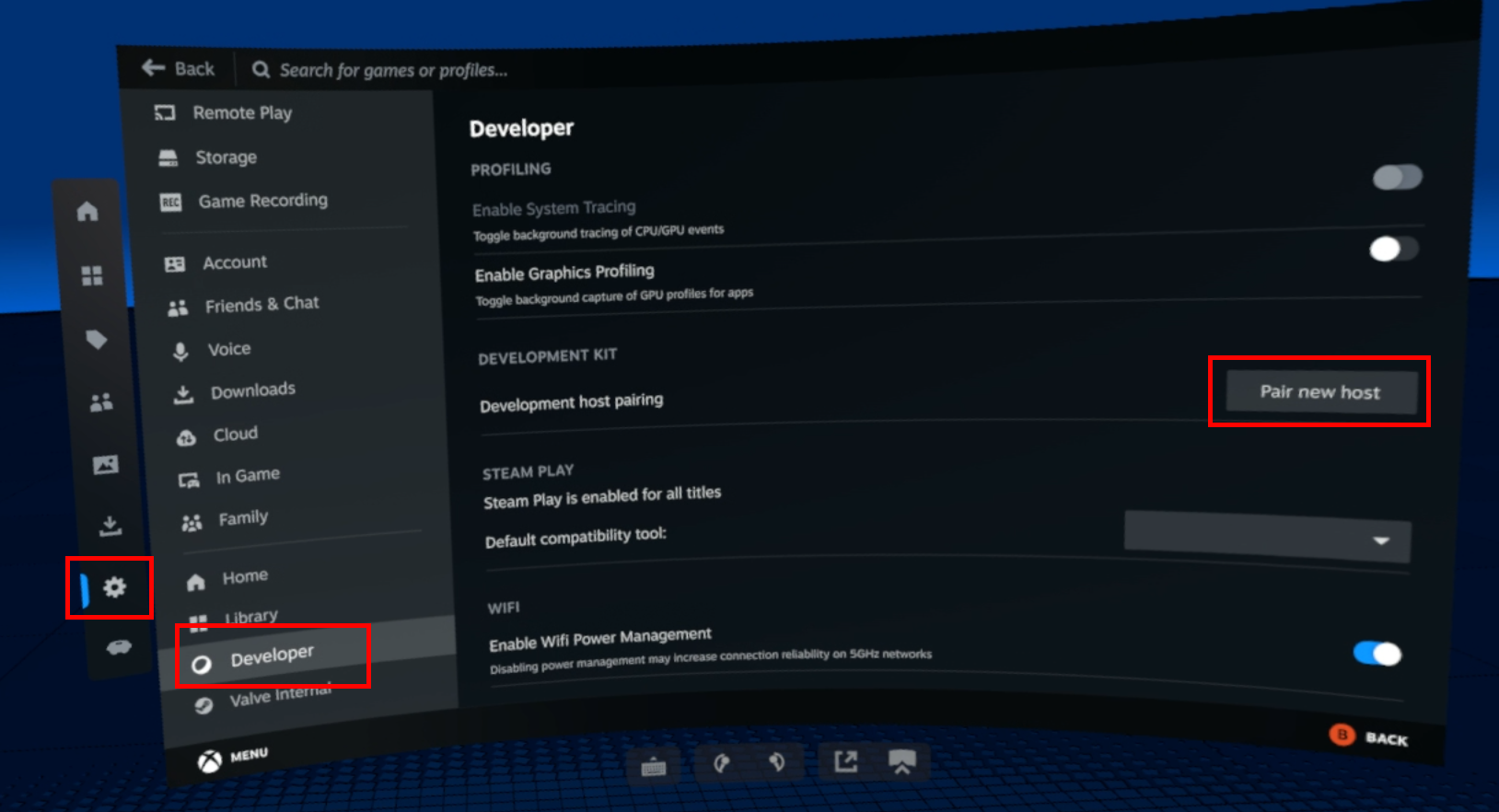
Then you can launch the SteamOS Devkit Client on your PC. Go to the Devkits tab and click Register next to the entry for your frame.
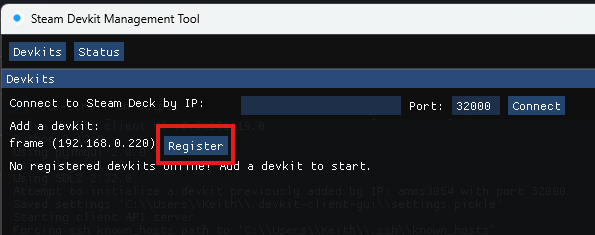
Confirm pairing on the headset and you're ready to deploy!
Click the Upload button, and once complete, click the Start button in order to run the application on the headset.
After uploading, the game will also appear in your Steam Library, under Library > Non-Steam > Devkit Game: (Your Game Title).
Environment variables on Linux are specified before the executable (e.g.
Pair your Steam Frame
First, make sure you have Developer Mode on in Settings > System > Developer Mode. Then go to Settings > Developer > Pair new host.Then you can launch the SteamOS Devkit Client on your PC. Go to the Devkits tab and click Register next to the entry for your frame.
Confirm pairing on the headset and you're ready to deploy!
Deploying with the SteamOS DevKit Client
Launch the SteamOS DevKit Client from Steam. Under Devkits you'll find Connect to devkit by IP where you can put in frame or your custom hostname if you've changed it. Then click on the Title Upload button.- Name: This will be the name that appears in your Steam Library on the headset.
- Local Folder: The location you want to upload files from. This will upload everything from the selected directory recursively.
- Start Command: If you made an APK put in the name of your APK. If you made a Linux or Windows build it should be the relative path (from the Local Folder) to the Linux binary or Windows executable (.exe)
- Runtime: Select Android if its an APK, Steam Linux Runtime 3.0 ARM64 (Sniper) if you made a Linux ARM64 binary. Steam Play (Proton) for Windows.
Click the Upload button, and once complete, click the Start button in order to run the application on the headset.
After uploading, the game will also appear in your Steam Library, under Library > Non-Steam > Devkit Game: (Your Game Title).
Command-line arguments and environment variables
You can set command-line options under the game's Properties in Steam like you would for any other application. The text in this field gets appended to the launch command (i.e.MyGame <options>). Environment variables on Linux are specified before the executable (e.g.
ENABLE_FOO=1 MyGame). You can do this in the Steam command line option field using the special %command% argument (e.g. ENABLE_FOO=1 %command%).


