Steamworks Documentation
Steam Personal Calendar
https://www.youtube.com/watch?v=m4hs3rDaBpo
The Steam Personal Calendar shows each player a list of recent and upcoming releases they are likely to be interested in. Because the recommendations are personalized for every user, the calendar is a useful way for players to discover their next game, and a useful way for your game to find the players most likely to want it.
This page covers where players see the calendar, what your game needs in order to be eligible, and what determines which games appear for each player.
The Personal Calendar appears in two places on the Steam Store:
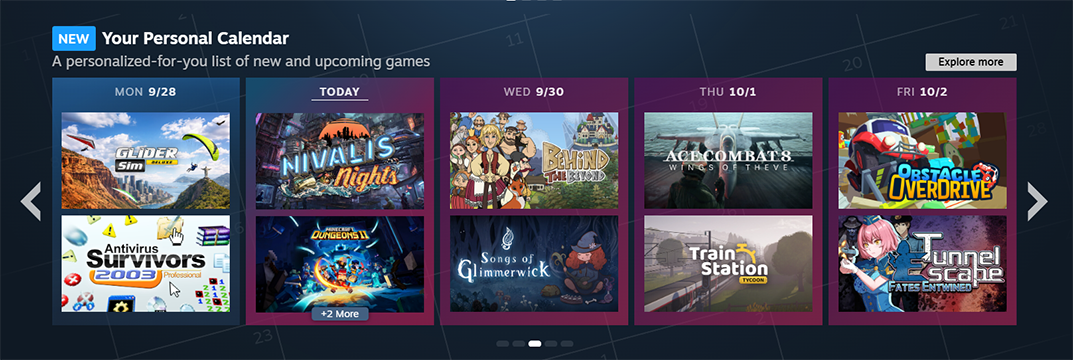
The Personal Calendar on the Steam Store front page.
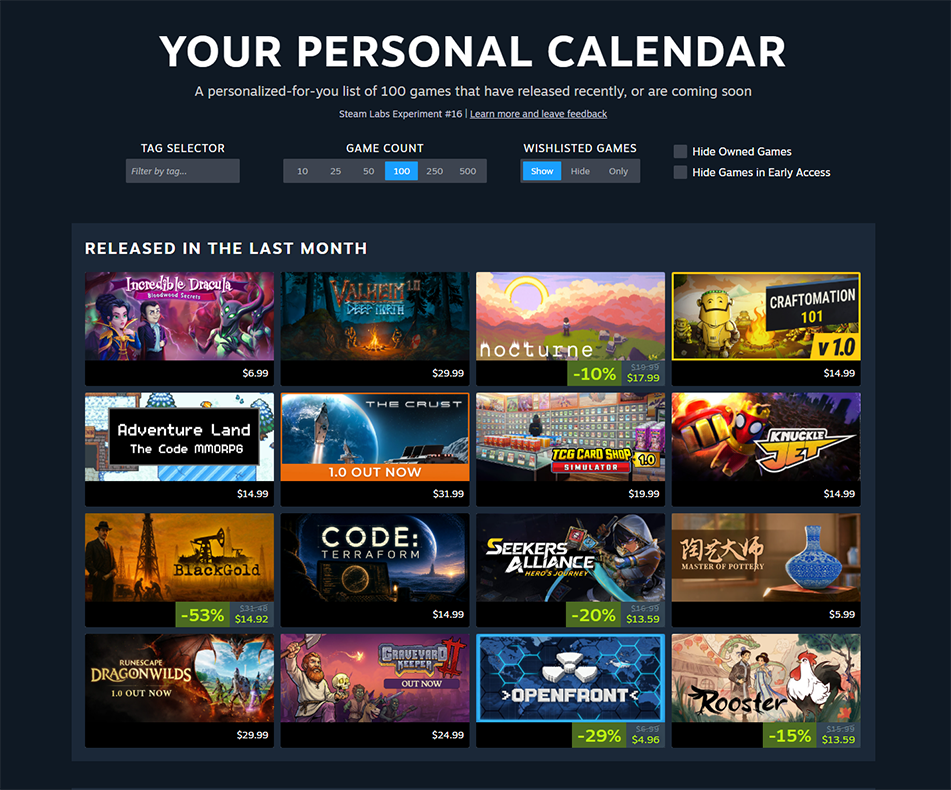
The dedicated Personal Calendar page.
Players can browse releases day by day and click through to the store page of any game that catches their eye.
To be eligible to appear on the Personal Calendar, your game needs a visible Coming Soon page with a specific release date. This applies whether you are launching a full release or moving from Early Access to 1.0.
Once your game becomes eligible, it can start appearing on the calendar within about a day.
Tip: To maximize your visibility, set your release date at least 60 days in advance to be eligible to appear on the dedicated calendar page, and at least three weeks in advance to be eligible to appear on the front page.
Every Calendar Is Personalized
There is no single, default calendar that everyone sees. Each player has their own calendar, tailored to their tastes. None of it is hand-curated; featuring on the Personal Calendar is entirely automatic and personalized for each user.
The calendar works by finding players with similar tastes and looking at what those players have wishlisted:
Because featuring is driven by player behavior and wishlists, the more wishlists your game has, the more likely it is to appear on players' calendars.
However, there is no hard wishlist threshold for appearing on the calendar. We also have checks in place to make sure that the wishlists counted come from real, valid accounts.
This doesn't mean only big games make the cut. Because the calendar is personalized, what appears is based on what each individual player is most likely to want, not on raw popularity or total wishlist counts.
If your release date is public and your game is within five weeks of launch, it may already be appearing on players' calendars.
You can still change your release date after your game has appeared on the calendar, whether it's a full release or an Early Access to 1.0 launch. However, if you delay your release date by more than 24 hours once your game is within two weeks of launch your game will be removed from the calendar. It won't appear in the calendar again until it releases. Changes of less than 24 hours will not impact your featuring on the calendar.
Games on a Player's Wishlist
Any game already on a player's wishlist automatically appears on their calendar as a reminder that it's on the way, unless the player has chosen to hide wishlisted games.
Review Score
If your game's review score falls to Mostly Negative, it is much less likely to be recommended on the calendar. This is consistent with how algorithmic featuring works elsewhere on the Steam Store. For more on how the store surfaces products, see Visibility on Steam.
Eligible App Types
Weekend Releases
The calendar currently shows Monday through Friday, since relatively few games launch on weekends (though this varies by time zone). Any product that releases on a Saturday or Sunday appears on the calendar on the following Monday.
The Personal Calendar is an automatic, personalized way for players to discover games they're likely to want to check out. To give your game the best possible chance of appearing on the calendars of the players most likely to buy it:
Q. How many wishlists does my game need to appear on the calendar?
A. There is no minimum. More wishlists increase the likelihood of appearing, but featuring is personalized for each player rather than based on total wishlist counts.
Q. Can someone at Valve manually add my game to the calendar?
A. No. The calendar is not hand-curated. Featuring is entirely automatic, based on player behavior and wishlists.
Q. If I move my release date, will my game appear on the calendar again?
A. No. You can still change your release date after appearing, but it will be removed from the calendar until it is released. Moving your game's release date won't earn your game more appearances on the calendar.
Q. Will my demo or DLC appear on the calendar?
A. Demos do not appear. DLC can appear, but only for players who own the base game.
Overview
The Steam Personal Calendar shows each player a list of recent and upcoming releases they are likely to be interested in. Because the recommendations are personalized for every user, the calendar is a useful way for players to discover their next game, and a useful way for your game to find the players most likely to want it.
This page covers where players see the calendar, what your game needs in order to be eligible, and what determines which games appear for each player.
Where Players See the Calendar
The Personal Calendar appears in two places on the Steam Store:
- On the Steam Store front page, where it shows the releases from this week, two weeks ago, and two weeks in the future.
- On its own dedicated calendar page, where it shows eight weeks of releases.
The Personal Calendar on the Steam Store front page.
The dedicated Personal Calendar page.
Players can browse releases day by day and click through to the store page of any game that catches their eye.
Eligibility Requirements
To be eligible to appear on the Personal Calendar, your game needs a visible Coming Soon page with a specific release date. This applies whether you are launching a full release or moving from Early Access to 1.0.
Once your game becomes eligible, it can start appearing on the calendar within about a day.
Tip: To maximize your visibility, set your release date at least 60 days in advance to be eligible to appear on the dedicated calendar page, and at least three weeks in advance to be eligible to appear on the front page.
How Featuring Works
Every Calendar Is Personalized
There is no single, default calendar that everyone sees. Each player has their own calendar, tailored to their tastes. None of it is hand-curated; featuring on the Personal Calendar is entirely automatic and personalized for each user.
How Games Are Selected
The calendar works by finding players with similar tastes and looking at what those players have wishlisted:
- Find similar players. To determine which players have tastes similar to a given player, the model considers signals such as the games they play, how much they play them, how their playtime compares to other players, and how many achievements they have earned.
- Surface wishlisted games. The model then surfaces games that those similar players have wishlisted but the given player has not.
- Place games by release date. Finally, those games are placed on the calendar according to their visible release date.
Wishlists Matter, but There Is No Threshold
Because featuring is driven by player behavior and wishlists, the more wishlists your game has, the more likely it is to appear on players' calendars.
However, there is no hard wishlist threshold for appearing on the calendar. We also have checks in place to make sure that the wishlists counted come from real, valid accounts.
This doesn't mean only big games make the cut. Because the calendar is personalized, what appears is based on what each individual player is most likely to want, not on raw popularity or total wishlist counts.
If your release date is public and your game is within five weeks of launch, it may already be appearing on players' calendars.
Changing Your Release Date
You can still change your release date after your game has appeared on the calendar, whether it's a full release or an Early Access to 1.0 launch. However, if you delay your release date by more than 24 hours once your game is within two weeks of launch your game will be removed from the calendar. It won't appear in the calendar again until it releases. Changes of less than 24 hours will not impact your featuring on the calendar.
Other Important Details
Games on a Player's Wishlist
Any game already on a player's wishlist automatically appears on their calendar as a reminder that it's on the way, unless the player has chosen to hide wishlisted games.
Review Score
If your game's review score falls to Mostly Negative, it is much less likely to be recommended on the calendar. This is consistent with how algorithmic featuring works elsewhere on the Steam Store. For more on how the store surfaces products, see Visibility on Steam.
Eligible App Types
- Games and software applications can appear on the calendar.
- Demos do not appear on the calendar.
- DLC can appear, but only for players who own the base game. DLC follows the same wishlist and player-behavior logic as all other products.
Weekend Releases
The calendar currently shows Monday through Friday, since relatively few games launch on weekends (though this varies by time zone). Any product that releases on a Saturday or Sunday appears on the calendar on the following Monday.
Summary
The Personal Calendar is an automatic, personalized way for players to discover games they're likely to want to check out. To give your game the best possible chance of appearing on the calendars of the players most likely to buy it:
- Publish a visible Coming Soon page with a specific release date, well in advance of launch.
- Focus on building healthy, organic wishlists.
- Pick your release date carefully. If you delay your release date by more than 24 hours once your game is within two weeks of launch your game will be removed from the calendar. It won't appear in the calendar again until it releases.
Frequently Asked Questions
Q. How many wishlists does my game need to appear on the calendar?
A. There is no minimum. More wishlists increase the likelihood of appearing, but featuring is personalized for each player rather than based on total wishlist counts.
Q. Can someone at Valve manually add my game to the calendar?
A. No. The calendar is not hand-curated. Featuring is entirely automatic, based on player behavior and wishlists.
Q. If I move my release date, will my game appear on the calendar again?
A. No. You can still change your release date after appearing, but it will be removed from the calendar until it is released. Moving your game's release date won't earn your game more appearances on the calendar.
Q. Will my demo or DLC appear on the calendar?
A. Demos do not appear. DLC can appear, but only for players who own the base game.



