Steamworks Documentation
- Documentation Home Page
- Getting Started
-
Store Presence
- Applications
- Coming Soon
- Developer And Publisher Homepages
- Early Access
- Explain Your Editions
- Franchise Pages
- Free To Play Games
- Graphical Assets - Overview
- Livestreaming
- Localization and Languages
- Pre-Purchasing on Steam
- Pricing
- Promo Event Tools, Rules, and Guidelines
- Release Dates
- Release Options
- Release Process
- Removing a product from Steam
- Review Process
- Roadmaps
- Season Passes
-
Steam China
- Steam Tags
- Store Page, Building and Editing
- Testing On Steam
- Top Sellers Lists
- Trailers
- Updating Your Game - Best Practices
- User Reviews
-
Features
- Anti-cheat and Game Bans
- Common Redistributables
- Enhanced Rich Presence
- Game Notifications
- Microtransactions (In-Game Purchases)
- Multiplayer
- Stats and Achievements
- Steam Audio
- Steam Cloud
- Steam Cloud Play (Beta)
- Steam Community
- Steam DRM
- Steam Error Reporting
- Steam Families
- Steam HTML Surface
-
Steam Input
- Action Manifest Files
- Action Set Layers
- Activators
- Browsing Configurations
- General Concepts
- Getting Started for Developers
- Getting Started for Players
- In-Game Actions File
- Input Source Modes
- Input Sources
- Legacy Mode Bindings
- Mode Shifting
- Mouse Regions
- Radial Menus
- Steam Input Devices
- Steam Input Gamepad Emulation - Best Practices
- Templates for In-Game Actions Files
- Touch Menus
- Uploading Steam Input Configs to Steam Workshop
- Steam Inventory Service
- Steam Keys
- Steam Leaderboards
- Steam Overlay
- Steam Playtest
- Steam Remote Play
- Steam Screenshots
- Steam Timelines
- Steam Voice
- Steam Workshop
- User Authentication and Ownership
- Virtual Reality
- Finance
-
Sales and Marketing
- Advertising on Steam
- Best Practices, Marketing
- Community Moderation
- Curators and Curator Connect
- Discounting
- Events and Announcements Tools
- Features And Tools, Marketing
- Followers
- Google Analytics
- Points Shop Items
- Profile Features
- Steam Branding Guidelines
- Steam Community Items
- Store and Platform Traffic Reporting
- Store Widget
-
Upcoming Steam Events
- Steam Next Fest
-
Steam Themed Sale Events
- Steam Auto Battler RPG Fest 2026
- Steam Cooking Fest 2026
- Steam Couch Co-Op Fest 2027
- Steam Desktop Companion Fest 2027
- Steam Dinos vs. Robots Fest 2027
- Steam Fighting Fest 2027
- Steam Medieval Fest 2026
- Steam Mountaineering Fest 2027
- Steam Racing Fest 2027
- Steam Real-Time Strategy Fest 2027
- Steam Rhythm Fest 2027
- Steam Scream V Fest
- Steam Sheep Fest 2027
- Steam Shop Keeper Fest 2027
- Steam Witch Fest 2027
- UTM Analytics
- Visibility on Steam
- Wishlists
- Steamworks SDK
- Web API Overview
- Accessibility Features
-
Steam Hardware
- Getting your game ready for Steam Deck and Steam Machine
- How to debug Windows games on Steam Deck and Steam Machine
- How to load and run games on Steam Deck and Steam Machine
- Steam Deck
- Steam Deck and Steam Machine Compatibility Review
-
Steam Frame
- Connecting adb to Lepton
- How to load and run games on Steam Frame
- How to upload Android APKs to Steam
- OpenXR Game Engine Integrations
- Setting up your Steam Frame for development
- Steam Frame Debugging
- Steam Frame Input
- Steam Frame Standalone Compatibility Review Process
- Suggesting default user settings for your game
- What games can run standalone on Steam Frame
- Steam Hardware and Proton
- Steam Machine
- Steam PC Café Program
-
Steamworks API Reference
- ISteamApps Interface
- ISteamClient Interface
- ISteamController Interface (Deprecated)
- ISteamFriends Interface
- ISteamGameCoordinator Interface
- ISteamGameServer Interface
- ISteamGameServerStats Interface
- ISteamHTMLSurface Interface
- ISteamHTTP Interface
- ISteamInput Interface
- ISteamInventory Interface
- ISteamMatchmaking Interface
- ISteamMatchmakingServers Interface
- ISteamMusic Interface
- ISteamNetworking Interface
- ISteamNetworkingMessages Interface
- ISteamNetworkingSockets Interface
- ISteamNetworkingUtils Interface
- ISteamParties Interface
- ISteamRemotePlay Interface
- ISteamRemoteStorage Interface
- ISteamScreenshots Interface
- ISteamTimeline
- ISteamUGC Interface
- ISteamUser Interface
- ISteamUserStats Interface
- ISteamUtils Interface
- ISteamVideo Interface
- SteamEncryptedAppTicket
- steamnetworkingtypes.h
- steam_api.h
- steam_gameserver.h
-
Steamworks Web API Reference
- IBroadcastService Interface
- ICheatReportingService Interface
- ICloudService Interface
- IEconMarketService Interface
- IEconService Interface
- IGameInventory Interface
- IGameNotificationsService Interface
- IGameServersService Interface
- IInventoryService Interface
- ILobbyMatchmakingService Interface
- IPartnerFinancialsService Interface
- IPlayerService Interface
- IPublishedFileModerationService Interface
- IPublishedFileService Interface
- ISiteLicenseService Interface
- ISteamApps Interface
- ISteamCommunity Interface
- ISteamEconomy Interface
- ISteamGameServerStats Interface
- ISteamLeaderboards Interface
- ISteamMicroTxn Interface
- ISteamMicroTxnSandbox Interface
- ISteamNews Interface
- ISteamPublishedItemSearch Interface
- ISteamPublishedItemVoting Interface
- ISteamRemoteStorage Interface
- ISteamUserAuth Interface
- ISteamUser Interface
- ISteamUserStats Interface
- ISteamWebAPIUtil Interface
- IStoreService Interface
- IUserReviewsService
- IWorkshopService Interface
Depots
A depot is a logical grouping of files which are all delivered to a customer as a single group. Depots are uniquely identified by a Depot ID. When a customer installs an app, one or more depots are downloaded and "mounted" on their local drive, according to the rules outlined in the Depot Mounting Rules below.
The depot order defines the mounting order, and files in depots that were mounted later override files in depots that were listed earlier. Thus the first depot in the list has the lowest priority. To change the depot order, you can drag and drop the depot entries around. To change fields, just click them.
The UI of the Depots page allows you to configure 4 different requirements.
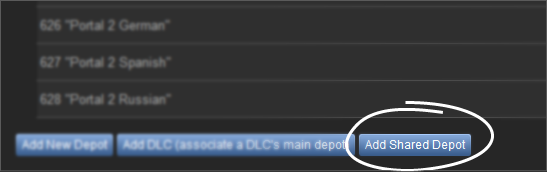
Shared depots will inherit properties of the Master App from which they originate i.e. Language, OS, Architecture and DLC.

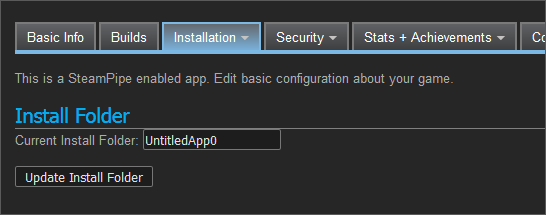
Once the depots are configured as shared, you can set the install folders to be the same between the two apps. This is required for the Steam client to keep only one copy of the content on the user's disk, but the install directories can be different if the shared depot content is small. Set the install directory on the General section under the Installation drop-down for your application's Steamworks Settings.
If you see a warning on your app landing page about an Operating System Depot missing from a package, that means you have an OS selected in the store data, and the package is missing at least one depot that can be mounted for that OS. Any users that own that package will not be able to download content for that OS. When this warning appears on your app landing page, you should probably correct it:

Shared depots, DLCs, or depots that contain the word "Debug" or "Internal" in their name will be excluded from this check. Most packages are checked, though any package with "For Beta Testing" or "Developer Comp" are excluded.
Depot Mounting Rules
As described earlier, all content depots for a game are configured on the Depots page in App Admin. This includes all localized depots, add-on depots, DLC depots, etc. Without any other changes, all owned depots are mounted by default in the order listed. The depot's name can be anything and is not part of the mounting rules.The depot order defines the mounting order, and files in depots that were mounted later override files in depots that were listed earlier. Thus the first depot in the list has the lowest priority. To change the depot order, you can drag and drop the depot entries around. To change fields, just click them.
The UI of the Depots page allows you to configure 4 different requirements.
- Language - Specifying a language for a depot will cause the depot contents to only download for users running Steam in that language. If your content should be available to users running in any language, use the default [All Languages] selection.
- OS - If this is set, the depot is only mounted on systems of given OS.
- Architecture - System Architecture: You only need to specify 32/64 bit architecture if you have separate depots for each. If you only have one depot, leave it set to [All Architectures]
- DLC - By default DLC depots and their content are managed under the base game AppID. If you want to offer a lot of different DLC depots for your product, turn on 'Manage DLC depots separately'. Then DLC depots are managed and uploaded separately under their own DLC AppID. This keeps the depot list for the base game short and reduces app meta data downloads by clients.
Shared Content Depots
If you have two applications that share content, it is possible include depots from a master application in another application. To add a depot from another application, go to Steampipe->Depots in the Steamworks Settings and click Add Shared Depot to browse for the depot you'd like to include (your account must have rights to modify Steamworks data on the app from which you are picking a shared depot).Note - Shared depots are still a work-in-progress, and should only be used when the base application has been released. You currently cannot share a depot from an unreleased application.
Shared depots will inherit properties of the Master App from which they originate i.e. Language, OS, Architecture and DLC.
Once the depots are configured as shared, you can set the install folders to be the same between the two apps. This is required for the Steam client to keep only one copy of the content on the user's disk, but the install directories can be different if the shared depot content is small. Set the install directory on the General section under the Installation drop-down for your application's Steamworks Settings.
Operating System Depots
If your app supports multiple platforms, you should use separate depots to store the platform specific content. For example, if your app natively supports Windows and Linux, have any Windows-specific files in a depot that is marked just for Windows as a depot. Likewise, have any Linux-specific files in a depot that is marked just for Linux. You can then have any common set of files in a depot marked for both Windows and Linux, or All Oses if you like.If you see a warning on your app landing page about an Operating System Depot missing from a package, that means you have an OS selected in the store data, and the package is missing at least one depot that can be mounted for that OS. Any users that own that package will not be able to download content for that OS. When this warning appears on your app landing page, you should probably correct it:
Shared depots, DLCs, or depots that contain the word "Debug" or "Internal" in their name will be excluded from this check. Most packages are checked, though any package with "For Beta Testing" or "Developer Comp" are excluded.



